
Following the general introduction you will find information on various aspects of making your computer "speak" Ukrainian. Instructions for PCs running one of the versions of standard Windows operating systems sold in North America and Apple Macintosh computers running OS X are available.
Unfortunately, until recently Ukrainian language encoding on PC's was not standardized and it was difficult to communicate unless you were using the same agreed upon solution. Many of us had adopted the solution offered by Key Co. This has served us well up to now for the localized applications we used to print out Ukrainian documents. Now with a greater sharing of computer files, emails, and web pages, a global standard has emerged. The widely accepted solution can be attributed to Microsoft's monopoly and the resulting forced standard. Since other products still differ in their levels of this standard support, it may be much simpler to adopt an all Microsoft approach to your Ukrainian computing needs and thus saving yourself some headaches. (it hurts to say this).
To get your computer to 'type' Ukrainian is actually quite easy and in the new Windows versions is included in the standard installation.
As much of the keyboard as possible is phonetic, only the highlighted letter placements must be memorized. The instructions below all install this keyboard. This keyboard will be easier to use than the Microsoft default Ukrainian keyboard in which you would have to memorize a completely new layout and develop a multi-key solution for typing '?' (ge) which MS seems to have forgotten.
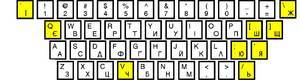
please leave here
Updated May/16 - fixed bug where "a/A" where English characters, not Ukrainian characters
Please watch this video for instal instructions: https://vimeo.com/104323823
Instructions:
All instructions for various Windows operating systems can be found on PLAST Australia's webpage: https://www.plast.org.au/font.php
N.B. The PLAST Australia keyboard layouts have the "Y" key mapped to a Ukrainian "У" and the "U" key mapped to a Ukrainian "И". If you wish to have these swapped (i.e. Y=И and U=У), please download this .zip file instead of the one found the PLAST Australia webpage.
Skip to step 3 if you want to leave the standard Windows Ukrainian Layout. Steps 1-2 replace the layout with the phonetic version described above.
Download the file KBDUR_PHONETIC.DLL to your Windows System directory where the file KBDUR.DLL is located (c:\Windows\System32\ for standard XP installations; c:\WinNt\System32 for standard NT/2000 installations).
Perform ONE of the next two substeps
This first option is prefered if you can do it.
Rename kbdur.dll to kbdur_orig.dll
Rename kbdur_phonetic.dll to kbdur.dll
It seems that Win2000 and XP have an automatic recovery feature that replicates a system file when you delete it. So the answer is to change the registry manually. So do this VERY carefully.
Click the Start button.
Click Run and type Regedit, then press OK.
Navigate to: \HKEY_LOCAL_MACHlNE\System\CurrentControlSet\Control\Keyboard Layouts\00000422.
Double click on "Layout File".
Type over the KBDUR.DLL with the new name KBDUR_PHONETIC.DLL.
Click OK.
Exit the Registry Editor. Note: You don't have to save anything, since the Registry is a database and once you change a value it is automatically saved.
Click the Start button.
Click Settings, then Control Panel.
From the Control Panel double click Regional and Language Options.
Click the Languages tab.
Click Details (NT/XP) or Change (2000).
Under Installed services, click Add.
In the Input language list, scroll down and select "Ukrainian"
Click OK to close the Add Input languages dialog box.
Click Apply (NT/XP) or OK (2000).
Under Installed services, click "UK Ukrainian".
Under Preferences, click Language Bar.
In the Language Bar Settings dialog box, select the Show the Language bar on the desktop check box.
Click OK to close the Language Bar Settings dialog box.
Click OK to close the Text Services and Input Languages dialog box.
Click OK to close the Regional and Language Options dialog box.
Close the Control Panel.
A system reboot may be required.
Follow the instructions below to add Ukrainian language support to your computer:
Click the Start button.
Click Settings, then Control Panel.
From the Control Panel select Add/Remove Programs.
Click on the Windows Setup tab.
Scroll down and click Multilanguage Support, and then click Details.
Make sure a check mark appears beside Cyrillic Language Support.
Click OK at the bottom of the Add/Remove Programs window.
Click OK again.
You might be prompted to insert your Windows 95/98 CD-ROM.
The changes will take effect after you re-boot your computer.
Close the Control Panel.
Copy the following files to your c:\Windows\System\ directory:
Using Windows Explorer navigate to the c:\Windows\System\ directory.
Note: This Step applies only if you have installed previous versions of Key Co. Ukrainian keyboard drivers, otherwise go to Step 15.
Copy the following file to your c:\Windows\System\ directory: RemoveOld.reg
In the c:\Windows\System\ directory locate the RemoveOld.reg file, right click on it and choose MERGE.
Click OK.
In the C:\Windows\System\ directory locate the Ukrinstall.reg file, right click on it and choose MERGE.
Click OK.
Close Windows Explorer.
Open Control Panel.
From the Control Panel double click on Keyboard.
Click on the Language tab, and then click Add.
Scroll down and select Ukrainian-KE 1251.
Click OK.
Click Properties.
Scroll down and select Ukrainian-KE 1251.
Click OK.
Make sure a check mark appears beside Enable Indicator On Taskbar.
Note the "hot key" that switches language modes (default is Left Alt+Shift).
Click OK.
Close the Control Panel.
Writing documents in Ukrainian
When multilingual and keyboard support have been added to your Windows NT / 2000 / XP computer, the language indicator with the letters "En" (English) or "Uk" (Ukrainian) will be displayed in the System Tray on the Task Bar.
Writing multilanguage documents is easy, just click on the indicator or press the "hot-key" to change language. Note that not all your installed fonts contain Ukrainian characters. The following basic fonts included with Windows contain Ukrainian characters: Arial, Courier New, Verdana, Comic Sans MS, and Times New Roman. A variety of other bilingual fonts can be purchased on-line or found on the Internet.